
Silent Manager white-list call2.2.2 - Google Play
You'll be able to see results in few seconds.
Publisher Description

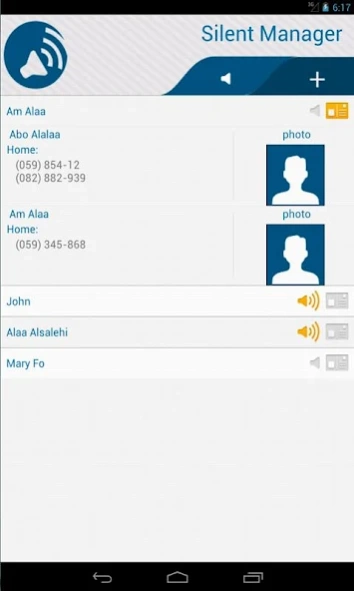
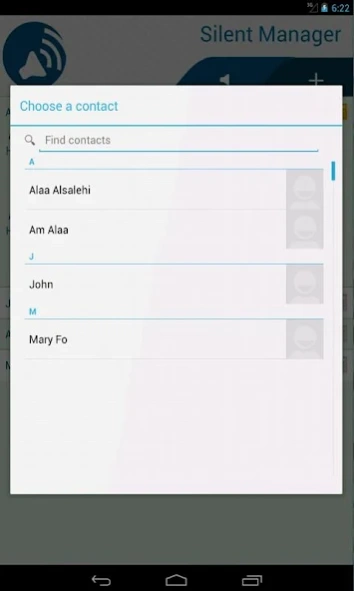
Silent manager helps you to manage your silent status for calls and SMSs.
#Black_Friday sales
Silent Manager manage your silent state
Silent manager helps you to manage your silent status for calls and SMSs.
Silent manager create white-list if anyone in the white-list calling you or send SMS to you, your mobile acting as in normal mode.
you can select a contact which contain many phone numbers
note: check your contact numbers it must be stored as displayed by your network
Who is need Silent Manager?
You are at work and your phone is silent, but your son was sick you miss that
You have a disabled mother and you are in a lecture. You want to stay updated about her needs
You are a businessman in a meeting you do not want to connect to any people except to wife or fiancée.
Your boss connects to you and your mobile is silent. What an embarrassing situation
Your mobile phone is silent and lost it and do not know where you put it
Silent Manager helps you to solve these problems and more
Features
1- Add and remove any contact to white-list
2- Full integration with contact application include
a- Joined contacts
b- Multiple phone numbers
3- Ring on call and Messages for white-list.
4- Sleep time, Silent Manager will stop itself in this time.
5- Full support of Android 2.3 or up
6- Remember you to check your white-list.
7- Long click on any item to have help.
8- Compatibility with third party programs like schedulers.
Usage:
1- Pick a contact
2- When a contact calls you and you're in silent state and the contact is in the white-list.Your mobile will ring as it isn't in the silent state.
3- have fun !!
Twitter:
https://twitter.com/servemecom
Facebook:
https://www.facebook.com/SilentManager
About Silent Manager white-list call
The company that develops Silent Manager white-list call is ServeMe. The latest version released by its developer is 2.2.2.
To install Silent Manager white-list call on your Android device, just click the green Continue To App button above to start the installation process. The app is listed on our website since 2019-07-15 and was downloaded 0 times. We have already checked if the download link is safe, however for your own protection we recommend that you scan the downloaded app with your antivirus. Your antivirus may detect the Silent Manager white-list call as malware as malware if the download link to com.serviceme.silentmanager is broken.
How to install Silent Manager white-list call on your Android device:
- Click on the Continue To App button on our website. This will redirect you to Google Play.
- Once the Silent Manager white-list call is shown in the Google Play listing of your Android device, you can start its download and installation. Tap on the Install button located below the search bar and to the right of the app icon.
- A pop-up window with the permissions required by Silent Manager white-list call will be shown. Click on Accept to continue the process.
- Silent Manager white-list call will be downloaded onto your device, displaying a progress. Once the download completes, the installation will start and you'll get a notification after the installation is finished.
Program Details
System requirements
Download information
Pricing
Version History
version 2.2.2
posted on 2019-07-15
Add help screen to explain Silent Manager.
version 1.7
1- Adding new screen for multi-picker contacts
2- Solving problems with hidden contacts like Facebook and contacts without phone numbers
version 1.8
Add google analyitics to improve user experience
Fix bugs
version 1.8.1
Fix bugs
Add messages to help user
version 2.0
Support for contact custom ring tone.
version 2.0.1
Fix bug appear on some versions
version 2.1.1
Fix kitkat bug for external ring tone.
version 1.4
posted on 2013-06-20
Several fixes and updates
Disclaimer
Official Google Play Link
We do not host Silent Manager white-list call on our servers. We did not scan it for viruses, adware, spyware or other type of malware. This app is hosted by Google and passed their terms and conditions to be listed there. We recommend caution when installing it.
The Google Play link for Silent Manager white-list call is provided to you by apps112.com without any warranties, representations or guarantees of any kind, so access it at your own risk.
If you have questions regarding this particular app contact the publisher directly. For questions about the functionalities of apps112.com contact us.
